User Manual for Planetary Aspects and Transits Software
For examples of use and more screenshots click here.
What the Chart Shows
Each planet orbits the Sun in its own orbital plane, and (with the exception of Pluto) these orbital planes almost coincide with the ecliptic plane. Thus it is approximately true that all the planets move in the ecliptic plane, with slight movements above and below it (somewhat larger vertical movements in the case of Pluto), so at any given time the position of a planet is approximately specified by a longitude, called the celestial longitude (a.k.a. the ecliptic longitude). Astrologers generally ignore the angle of a planet above or below the ecliptic plane, and consider only its celestial longitude.
The chart displayed by this program is not the kind of horoscope chart displayed by most Western horoscope programs. A Western natal horoscope represents a picture of the sky at the time and place of your birth. The 9 o'clock position corresponds to the eastern horizon. This is the position which is 'ascending' (in the sky) at that time and so it is called the 'ascendant'.
In contrast, the chart displayed by this program represents the planets on the ecliptic, as viewed from a position in space directly above the Earth. The ecliptic is divided into 360 degrees. The 3 o'clock position corresponds to zero degrees, and degrees increase anti-clockwise, so 90 degrees is at the 12 o'clock position.
For example, see the chart here. Uranus is at 32°11', which is 2°11' in Taurus (as shown in the tabular display below the graphical display). The Sun is at 106°15', which is 16°15' in Cancer. Jupiter is at 223°21', which is 13°21' in Scorpio. And Pluto is at 290°7', which is 20°7' in Capricorn.
Even though the chart as displayed in this program is not the same as the chart displayed in a Western horoscope, the zodiacal positions of the planets in the two charts is the same (when calculated correctly).
Aspects and Transits
When the angular separation of two planets (that is, the difference in their longitudes) is close to 0°, 30°, 45°, 60°, 90°, 120°, 135°, 150° or 180° then the planets are said to form an aspect. These have names: conjunction (0°), square (90°), opposition (180°), etc.When three or more planets are such that each pair of planets forms an aspect then we have what is called an aspect pattern. For a more detailed explanation of aspects and aspect patterns see Planetary Aspect Patterns.
Contemporary astrological practice (in which natal charts and transits are interpreted and used for prediction) employs astrological signs (Aries, Gemini, etc.) and houses (twelve of them, each divided into three decans), and proceeds to add complications such as planets ruling signs and houses, and planets being exalted, dignified, etc., according to which house they are in. Signs are classified as cardinal, fixed and mutable. Houses are said to correspond to work, relationships, etc.
This software does not include these complications, being concerned only with aspects and transits. It has two purposes: (i) to provide practicing astrologers (and those with an interest in astrology) with accurate and easily accessible data concerning world transits, natal charts, personal transits and synastry and (ii) to provide information about planetary aspects and transits so as to check the claims of Richard Tarnas in his book Cosmos and Psyche. What is needed for the latter is only an understanding of aspects and transits and some grasp of the meaning of planetary archetypes (for which see Cosmos and Psyche).
A transit occurs when an actual (that is, a moving) planet forms an aspect with a planet in the natal chart, so transits occur over a period of time. Richard Tarnas also uses the term to mean an aspect between two actual planets lasting a certain period of time. The duration of a transit may be short (perhaps just hours) or long (perhaps years), and depends on the value assigned to the orb for that aspect: the larger the orb the longer the transit.
The concepts of natal chart, personal transit and world transit are basic to the the use of this software. Richard Tarnas explains these concepts as follows:
The natal chart: The positions of the planets relative to the time and place of an individual's birth are regarded as bearing a significant correspondence to the person's life as a whole, reflecting the specific archetypal dynamics and relationships expressed in his or her specific psychological tendencies and biography.Personal transits: The positions of the planets at any given time in relation to their positions at an individual's birth are regarded as bearing a significant correspondence to the specific experiences of that person at that time, reflecting a dynamic activation of the archetypal potential symbolized in the natal chart.
World transits: The positions of the planets relative to the Earth at any given time are regarded as bearing a significant correspondence to the prevailing state of the world, reflecting the state of collective archetypal dynamics visible in the specific historical and cultural conditions and events of that time.
In all three forms of correspondence, the particulars of the planetary interaction — which planets are involved and how they are geometrically aligned with each other — are considered to be the most important determining factors in understanding the corresponding human phenomena.
Midpoints
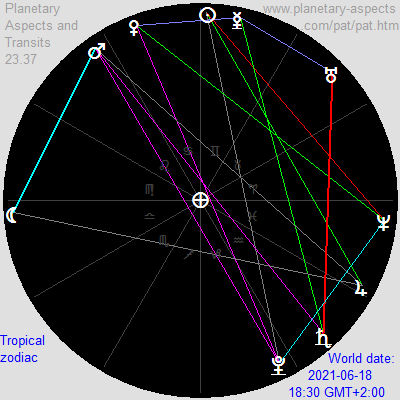 A midpoint in astrology is a point C on the ecliptic (whether geocentric or heliocentric) which is equidistant between two other points A and B on the ecliptic at which planets are present. Equidistant means an equal angular distance from those two planets, whether it is measured the short way around the ecliptic or the long way. Thus there are always exactly two midpoints between two planets.
A mathematical "midpoint" is of interest astrologically only if there is a third planet present at that point (or close to it), so that (in theory) the influences of all three planets are combined. When there is a midpoint there may or may not be an aspect (for example, semisextile) between the planets at A and C (and thus those at C and B). If there is, then there is also an aspect between the planets A and B (in this example, sextile). Such a midpoint is designated as A-C-B.
In the chart at right there are two midpoints, Venus-Mercury-Uranus and Saturn-Mars-Pluto.
Midpoints are considered (by many astrologers) to be significant whether or not there is an aspect present between some pair of planets among the three planets themselves.
Use of the Software
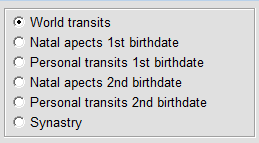 There are four types of calculations which can be made:
- World transits for a given date and time
- The natal chart for a person's birth date
- Personal transits for a person's birth date and a given world date
- Synastry between two people's birth dates
Each of these can be calculated either using a tropical zodiac or a sidereal zodiac (see more on these below).
Screenshots showing a world transit, a personal transit and a synastry may be found at Examples — Friedrich Nietzsche.
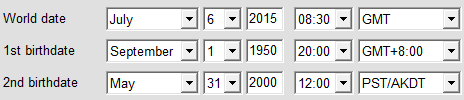 When a date is specified (whether world date or birth date) a time may optionally also be specified. If no time is given then it defaults to 12:00. The time may also be qualified by reference to a timezone. If no timezone is given then it defaults to the local timezone (the timezone of the computer being used). So, for example, if a person is known to have been born at 3 p.m. in Rome, Italy, then the time should be specified as 15:00 GMT+1:00. The configuration panel allows inclusion or exclusion of U.S. timezone abbreviations such as PST and PDT.
The range of dates which may be entered is from January 1, 1 CE, through December 31, 2799 CE. The longitudes of Uranus, Neptune, Pluto and the Moon cannot be calculated by this software for dates prior to January 1, 1600 CE, so for such dates these planets will not appear in the table or in the graphical display. The longitudes of Pluto and the Moon cannot be calculated by this software for dates after December 31, 2099 CE.
Clicking on the 'Now' button sets the world date to the current date, time and timezone, as read from your computer.
To calculate world transits for a particular date, to get a natal chart for a person's birthday, to get the personal transits for a particular person at a particular world date or to calculate the synastry for two people, enter the appropriate dates and select the output desired.
When changing dates and times by means of the drop-down menus you may need to click on the 'Compute' button to get the result in tabular or graphical form. Do this especially if the 'Display chart' (which changes to 'Display table') button is not visible. You can easily switch back and forth between the tabular display and the graphical display using this button.
The results are displayed in a table, and can also be displayed graphically. An example of tabular and graphical results for a world date are given in the Introduction, and examples of the other types of calculation are given here. An 'r' following the longitude of a planet indicates that it is retrograde (that is, apparently moving backwards). It is fairly common for planets to be retrograde; this is due to the relative motions of the planets and the Earth.
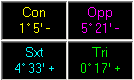 The angle values in the table give the difference in degrees and minutes from the exact value of an aspect. For example, if Mars and Venus are shown as Sqr 3° 0' that means that the difference in their longitudes is 3° away from the exact value for a square aspect, namely, 90°, so that difference is between 87° and 93°. A '+' following an angle value means that the aspect is increasing at the date and time shown, and a '-' means that it is decreasing.
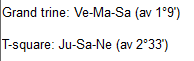 Aspect patterns with three or four planets have an "av." value shown. Each aspect in the aspect pattern differs from an exact aspect by a certain amount, and the "av." value is the average of these differences. For example, a Jupiter-Mercury-Moon T-square may be composed of a Jupiter-Moon opposition with exactness of 0°37', a Jupiter-Mercury square, 1°43', and a Mercury-Moon square, 2°20', with average difference-from-exact of 1°34'. By moving forward and back by a day or a half-hour one can find the date (and time) at which the average value is a minimum and thus the aspect pattern itself is most exact.
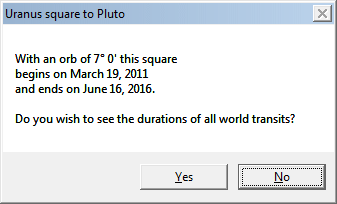 With world transits, double-click on an aspect (in the table) to display the duration of the transit, as illustrated at right.
With a world transit, answering 'Yes' to the question brings up a report such as the one below (which can also be accessed via the 'Report' button):
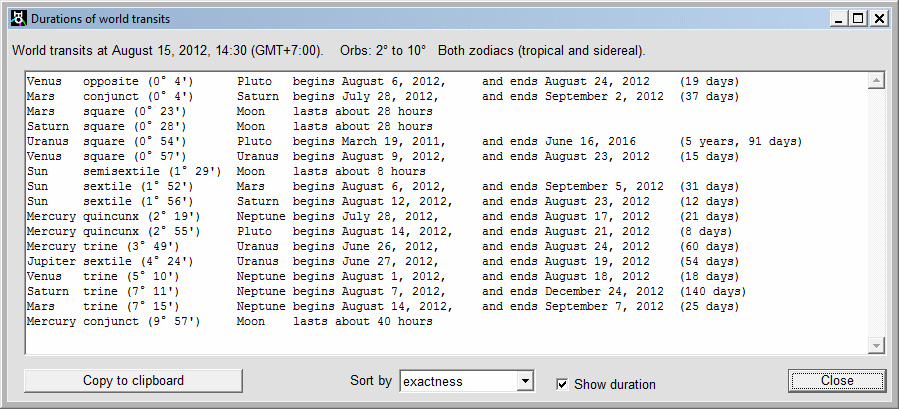
The phrase 'Both zodiacs (tropical and sidereal)' does not mean that the results shown are somehow a "blend" of the two systems (as one user thought). Rather it means that the results are the same regardless of whether the tropical zodiac or the sidereal zodiac is being used.
The same kind of report is available for personal transits by clicking on the 'Report' button, as illustrated below. For personal transits, however, the results do depend on which zodiac is selected.
With personal transits, double-clicking on an aspect (in the tabular display) displays not the report but rather a graphic image of the duration of the transit, showing the positions of the transiting planet relative to the natal planet, as illustrated below. This shows the Uranus return for C.G.Jung (born 26 July, 1875, died 6 June, 1961):
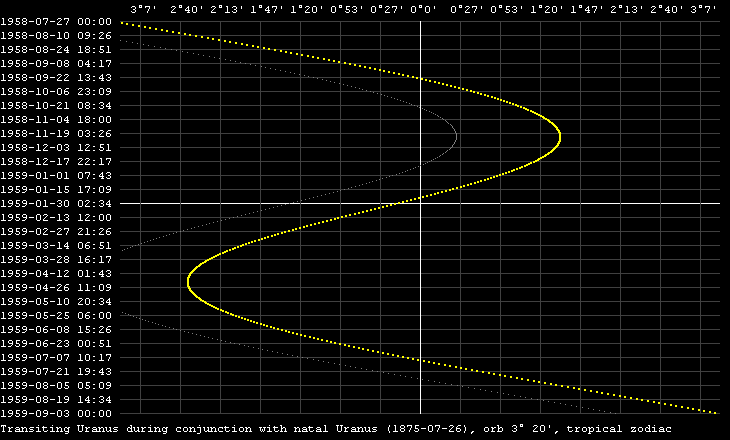
The middle part of the graph shows that Uranus was retrograde from approximately November 24, 1958, to April 22, 1959. (Actually, as can be found by inspection of tabular values in this program, it was retrograde from November 22, 1958, to April 19, 1959.)
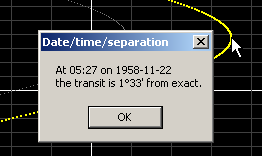 The colored graph shows the difference from exact conjunction when the tropical zodiac is used, and the gray line shows the difference when the sidereal zodiac is used. The selection of zodiac in the Configuration panel determines which graph is colored (namely, the graph for the selected zodiac) and which is gray. Right-mouse-click on a (non-black) pixel shows the corresponding date and time, as shown at right.
For aspects other than conjunction, the graphs show the difference when the longitude of the transiting planet is offset by the appropriate amount (e.g., 90° for squares and 120° for trines).
These graphs can be saved as PNG files by clicking on the 'Save image as ...' button.
The 'Forward' and 'Back' buttons move forward or back by the selected period: 30 minutes, 1 day, 1 week, 1 month or 1 year. When the chart (the graphical image of the location of the planets) is displayed, a 'Run' button appears. This is used to run the graphical display forward by 1 day, 1 month or 1 year until stopped.
If world transits are displayed then the 'Run' button allows you to search for a particular aspect pattern (stepping by 1 day, 1 week, etc.). You can also tell it to look for the simultaneous occurrence of two or more of the selected aspect pattern. (See Aspect Pattern Search below.)
The state of the program can be saved via the 'Save as ...' button. This is useful for saving a particular person's birth date (so the file should be named after them) and for saving a particular pair of birth dates (again with the file named appropriately). A file so saved can then be loaded again later to restore the program state. Program state files always have extension pat.
The saved-state PAT files have the same format as the saved-state HPAT files, so it's possible to save a PAT state and load it into HPAT so as to compare easily the geocentric and heliocentric configurations for a single date and time.
 When the graphical image is displayed the 'Save image as ...' button allows you to save the image to a PNG file. You can choose between a black background (as onscreen) or a white background by means of the 'Save graphic ...' checkbox in the configuration panel (see below). A black background provides better contrast for an image displayed in a web page, so a white background is recommended only if you wish to print the image (so as to save on ink).
Same-Planet Aspects
A same-planet aspect is an aspect between two planets with the same name. There are two kinds:
- An aspect between a transiting planet and its corresponding natal planet.
- An aspect between planets of the same name in a synastry chart.
Such aspects are more significan that other aspects simply because the planets are the same.
In order to make it easier to spot same-planet aspects both the table of personal transits and the synastry table have a diagonal which is colored gray rather than black. Here is an example of a personal transits table showing the personal aspects on February 9, 2021, for a person born on April 10, 1986:
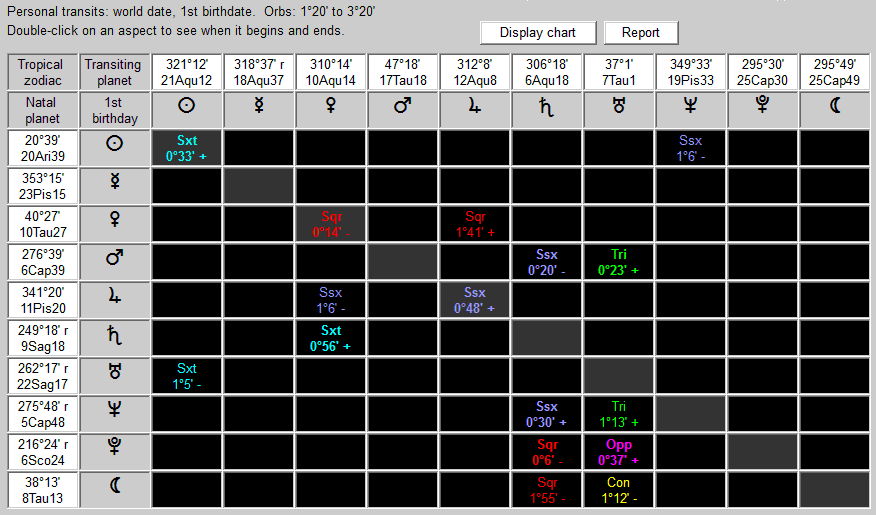
This reveals three same-planet aspects, namely:
- Transiting Sun sextile to natal Sun
- Transiting Venus square to natal Venus
- Transiting Jupiter semisextile to natal Jupiter
This might not be a good day for romantic involvement.
Here is an example of a synastry table for the same birth date as the person above with a person born July 21, 1978:
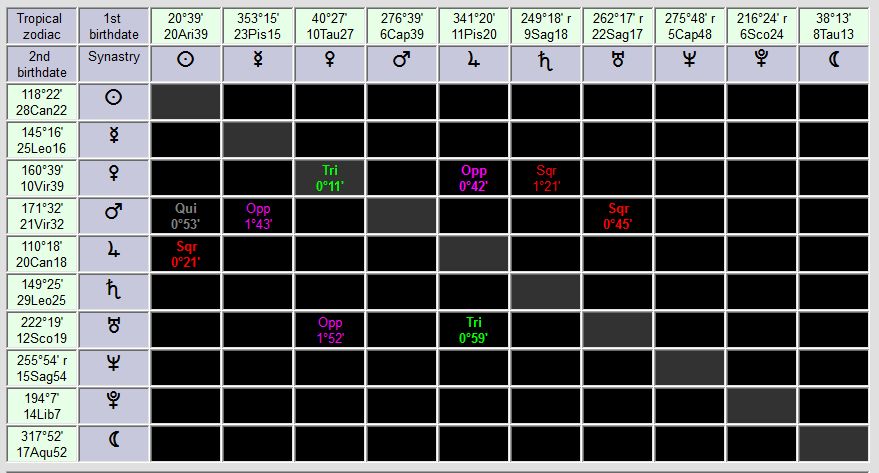
The trine aspect between the first person's natal Venus and the 2nd person's natal Venus suggests a positive romantic relationship. But the square and opposite aspects to the second person's natal Venus from the first person's natal Jupiter and natal Saturn indicate possible difficulties.
Aspect Pattern Search
This software makes it easy to search for aspect patterns and for a certain number of aspect patterns of one kind occurring simultaneously.The search function is available only for world transits, not for personal transits, and you can only search forward, not back.
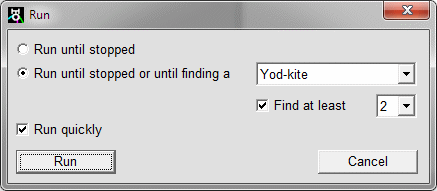 To use the search function:
- Select the world date (and time) at which you wish to begin the search.
- If the table is displayed then click on "Display chart".
- Set the step size for the search ("1 day" is recommended).
- Click on "Run". A window then opens which allows you to "Run until stopped or until finding a ..."
- Select the aspect pattern you want to search for (e.g. a grand trine).
- If you want to search for two or more such patterns occurring simultaneously then check the "Find at least" box and specify the number.
- Check the "Run quickly" box.
- Click on the "Run" button.
The program then calculates a series of charts according to the step size and stops if and when it finds the specified number of aspect patterns of the specified kind.
Configuration
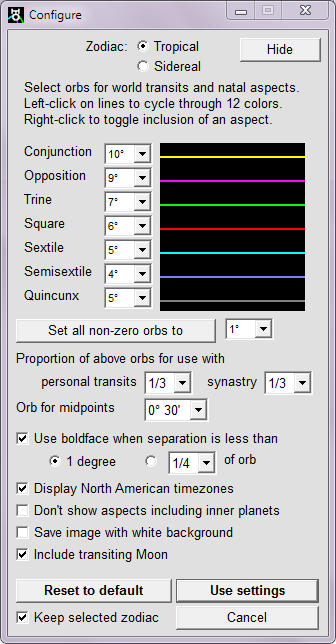 Clicking on the 'Configure' button brings up the panel shown at right.
Tropical and Sidereal Zodiacs
There are two zodiacs in use by astrologers. Vedic (Indian) astrologers use a sidereal zodiac whereas most Western astrologers use a tropical zodiac. The difference between them lies in the reference direction used as the zero for specifying planetary longitudes. The Vedic system uses the direction of a constant point on the ecliptic, a point in the constellation of Aries, so it is known as zero degrees Aries. In the 2nd century CE the Greek astrologer Claudius Ptolemy took zero degrees Aries to be the direction of a line from the Earth through the Sun at the moment of the vernal equinox. Due to what is called the precession of the equinoxes this direction is now no longer the same as the direction used by Vedic astrologers. Over the centuries the difference has increased, so that now (2010) the difference between them is about 24°. Consequently the position with respect to zero degrees Aries of a planet according to the tropical zodiac differs by about 24° from its position according to the sidereal zodiac, with the result that often planets are located in different astrological signs in the two zodiacs. This has given rise to debate among Western astrologers as to which zodiac is preferable. For a more detailed discussion of these two zodiacs (and their influence on personal transits) see Tropical and Sidereal Zodiacs. This software allows you to use whichever zodiac you prefer.
Orbs
When two planets form an aspect, that aspect may be exact or it may differ from exactness by some number of degrees. The number of degrees which is acceptable is called the orb. The orb affects the number of aspects (the larger the orb the more aspects).Orbs for world transits and natal aspects can be set for each of the seven aspects as shown at right; the values can range from 0° to 15°. When an orb is set to 0° that aspect will not appear in the tabular or graphical output. This allows you to exclude aspects from the table and the image which may not be relevant. When the orb for an aspect is set to 0° that aspect will not appear in the aspect counts nor will any aspect pattern which includes that aspect. (Compare to the alternative method of aspect-exclusion given below.)
Orbs for personal transits are specified as some proportion of the orbs for world transits; this can range from 1 to 1/5. These orbs apply equally to all planets. Synastry orbs can be set in the same way, independently of the orbs for personal transits.
The midpoint orb is set separately. Any of eight values can be selected, from 0° 5' to 3°. The larger the midpoint orb, of course, the more midpoints will appear. To avoid an excessive number, the midpoint orb should normally be set to 1° or less.
When the 'Don't show aspects including inner planets' checkbox is checked, then only aspects involving any two of Jupter, Saturn, Uranus, Neptune and Pluto are displayed in the chart.
Changes to the settings do not take effect until you click on the 'Use settings' button. You can cancel any changed settings by clicking on the 'Cancel' button.
When the 'Keep selected zodiac' checkbox is checked, the current zodiac setting is not changed by the 'Reset to default' button.
Aspect Colors
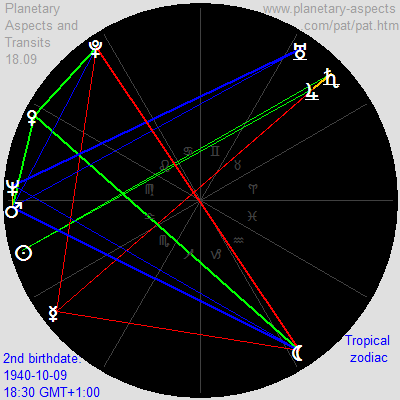 In this software each of the seven aspects has its own color, as shown above. You may assign any of twelve different colors to the aspects by left-mouse-clicking on the colored lines in the Configuration window. For example, if you wish to have conjunctions colored yellow, oppositions and squares colored red, and trines and sextiles colored dark blue, then you may do so.
Or you might wish to color the aspects according to the Huber approach to astrology: Red for squares and oppositions (depicting dynamic energy), blue for sextiles and trines (depicting relaxing energy), green for semisextiles and quincunxes (depicting inquisitive energy) and orange for conjunctions (depicting the blended energy of creativity). The image at right shows the natal chart in Huber colors for John Lennon.
Right-mouse-clicking on a colored line will set the aspect color to black. In this case the aspect does not appear in the table or in the graphic, but it is still counted, and an aspect pattern including this aspect is still counted. When an aspect color is black, right-mouse-clicking on the aspect color box will restore the original color.
Exactness of Aspect
You can also specify when an aspect is shown as "close" by specifying that boldface (in the table) or a thick line (in the graphical display) should be used when the separation is (a) less than either one degree or (b) less than a certain proportion of the orb (the proportion can be selected from nine values in the range 1/20 to 1/2).The checkboxes for color and boldface apply also to the graphical display. If the boldface checkbox is checked then lines joining planets in the graphical display are thick if the separation is less than 1° or less than the specified proportion of the orb, otherwise they are thin.
Transiting Moon
In natal charts and synastry the natal Moon (Moon position at time of birth) has a fixed position. In charts for personal transits the natal Moon has also, but there is also a transiting Moon (Moon position at a specified time). For a chart of personal transits you can choose to include the transiting Moon or to exclude it. This choice does not affect the other types of chart.
Day-to-Day Understanding of Planetary Transits
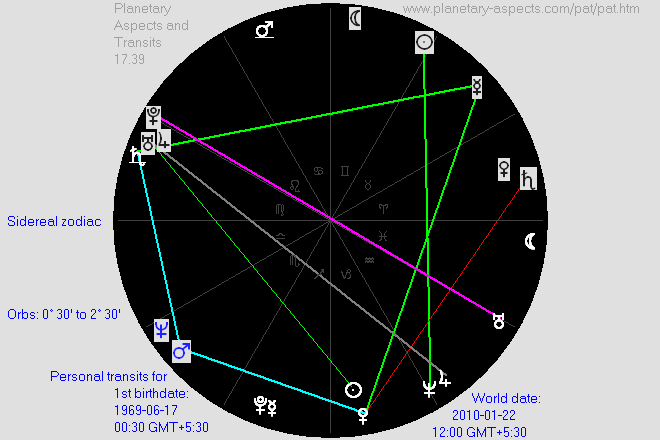
After you enter your birthdate (you don't need to know the exact time) you can click on the 'Now' button and then select 'Personal transits' to see the relation between the current planetary positions and those of your natal planets. For example, if you were born on June 17, 1969, and today's date is January 22, 2010, then (using the default settings for orbs and, in this example, the sidereal zodiac — not the tropical zodiac) the graphic image for your personal transits shows a total of 14 transits. We can eliminate the less-exact transits by reducing the proportion for personal transits (in the Configuration panel) from 1/3 to 1/4. The graphic image then shows 9 transits: 1 opposition (mauve), 1 square (red), 4 trines (green), 2 sextiles (light blue) and 1 quincunx (gray):
You can then click on the 'Report' button to get:
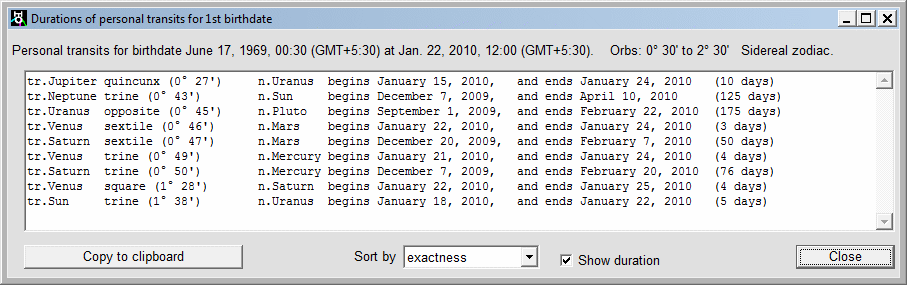
Thus the program allows you to identify the current transits and to find out when they begin, when they end, and when they become exact (by using the 'Back' and 'Forward' buttons).
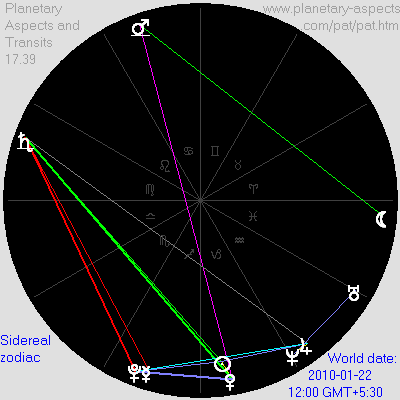 By viewing the images for the current world transits and for the transits in your natal chart
you can work out when aspect patterns occur in your personal transits. In this example the positions of transiting Venus and Saturn (white-on-black), and natal Mercury and Mars (black- or blue-on-gray), suggest the possibility of a kite aspect. For this, (a) transiting Venus must be trine to transiting Saturn,
and the chart for world transits (at right) confirms this ...
By viewing the images for the current world transits and for the transits in your natal chart
you can work out when aspect patterns occur in your personal transits. In this example the positions of transiting Venus and Saturn (white-on-black), and natal Mercury and Mars (black- or blue-on-gray), suggest the possibility of a kite aspect. For this, (a) transiting Venus must be trine to transiting Saturn,
and the chart for world transits (at right) confirms this ...
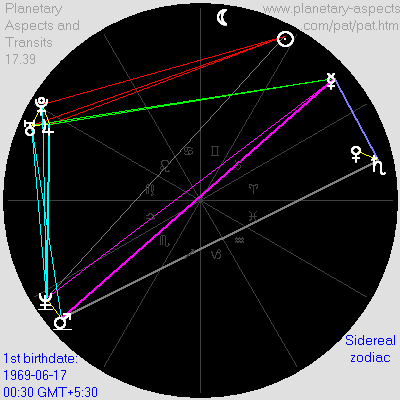 and (b) natal Mercury must be opposite to
natal Mars, and the natal chart (at right) confirms this. Thus on this day the
transiting planets Venus and Saturn form an exact kite with the natal planets Mercury and Mars (with all aspects less than 1°) — an auspicious aspect pattern, though it
must be interpreted with regard to the archetypal qualities of the four planets involved. Something planned for this day (by the person whose birthdate this is) would likely be successful.
and (b) natal Mercury must be opposite to
natal Mars, and the natal chart (at right) confirms this. Thus on this day the
transiting planets Venus and Saturn form an exact kite with the natal planets Mercury and Mars (with all aspects less than 1°) — an auspicious aspect pattern, though it
must be interpreted with regard to the archetypal qualities of the four planets involved. Something planned for this day (by the person whose birthdate this is) would likely be successful.
Good and Bad Days
For millennia some days have been considered "good" (auspicious) and some "bad". In Babylonian times (and occasionally today in some quarters) whether a day was "good" or "bad" depended solely on the number of its day in the (or in some) calendar. This software enables a more "scientific" approach to this question.The author recently had an unpleasant experience which involved errors of judgement and anger-management issues. Upon consulting his personal transits (later) he found that, at the time of this experience his transiting Moon was almost exactly square both to his natal Mercury (0°49') and to his natal Neptune (0°17'), and his transiting Venus was almost exactly opposite his natal Sun (0°49'). Unlikely to be a "coincidence"! This double-square lasted only two hours (the two hours leading up to this experience) since the Moon moves comparatively quickly. The Moon is associated with emotion and Mercury is associated with thinking and judgement, so this double-square configuration has Warning! written all over it. (A grand trine was also present, involving transiting Jupiter and Uranus, and natal Venus and Moon — which in itself would suggest a "good" day — but the nearly-exact lunar double-square apparently overrode this.)
Another example is given by an unfortunate incident nine days later in which the author, suddenly meeting a lady, failed to act as he obviously should have, resulting in inconvenience for the lady and regret on the part of the author for his "stupidity". Upon consulting his personal transits (later) he found that, exactly at the time of this incident both his transiting Sun and his transiting Venus were opposite (1°0' and 2°58' respectively) his natal Venus (planet of love), and in addition his transiting Sun was square (1°21') his natal Saturn. (The grand trine mentioned in the previous paragraph was still present, but didn't help.)
Another confirmation that personal astrology is not rubbish: I went to the supermarket to shop for food. I often have linguini and bolognese sauce for dinner. When at the check-out counter I turned the basket on its side to remove the items I'd collected and —damn! — the jar of bolognese sauce rolled off the counter to the ground and the jar broke, spreading bolognese sauce on the floor! When I got home I checked my personal transits for the time of the accident:
- Transiting Uranus exactly (0°0') square natal Pluto
- Transiting Jupiter almost exactly (0°6') square natal Jupiter
- Transiting Sun almost exactly (0°6') square natal Sun
- Transiting Pluto very close (0°38') to an exact square with natal Jupiter
What is the probability that at this same time my jar of bolognese sauce falls off the counter and crashes to the ground?
So it is advisable, each day, to inspect one's personal transits (and to use the facility to move forward by 30 minutes) to see whether (at sometime during the day or evening) the transiting Sun or Moon makes a square or opposite aspect to any of your natal planets. If so, be warned, especially if the transiting Sun or Moon forms a square or opposite aspect to your natal Mercury or Venus. And the transiting Moon usually forms a square aspect to at least one of your natal planets several times each (lunar) month.
Another thing to look for would be whether a transiting planet is (or becomes) square or opposite its corresponding natal planet, e.g. if transiting Venus is opposite natal Venus (as in the second case above), or if transiting Saturn is square to natal Saturn (which could indicate a vulnerability to physical accident, such as a fall). In the case of Jupiter and Saturn, the transit of transiting planet to natal planet would last several weeks, so indicates a period of danger (especially when the transit starts to approach exactness) rather than a particular day. On the other hand, the Moon is square to the natal Moon only for a period of about eight hours.
| Contents | Tropical and Sidereal Zodiacs |
| Introduction | Home Page |